
Elyra Desktop: the same agent, in a window
Elyra has always lived in the terminal. That was a choice, not an accident: the terminal is where the code is, where the tests run, where git answers, and a coding agent that lives there can see everything you see. It is still the right home for a lot of people.
But not for everyone, and not for every moment. Some people never open a terminal by choice. Some do, but want to read a long diff in a proper pane rather than a scrollback. Some want to leave a session running in a window on the second screen and glance at it the way you glance at a build. And some simply prefer a button to a slash command.
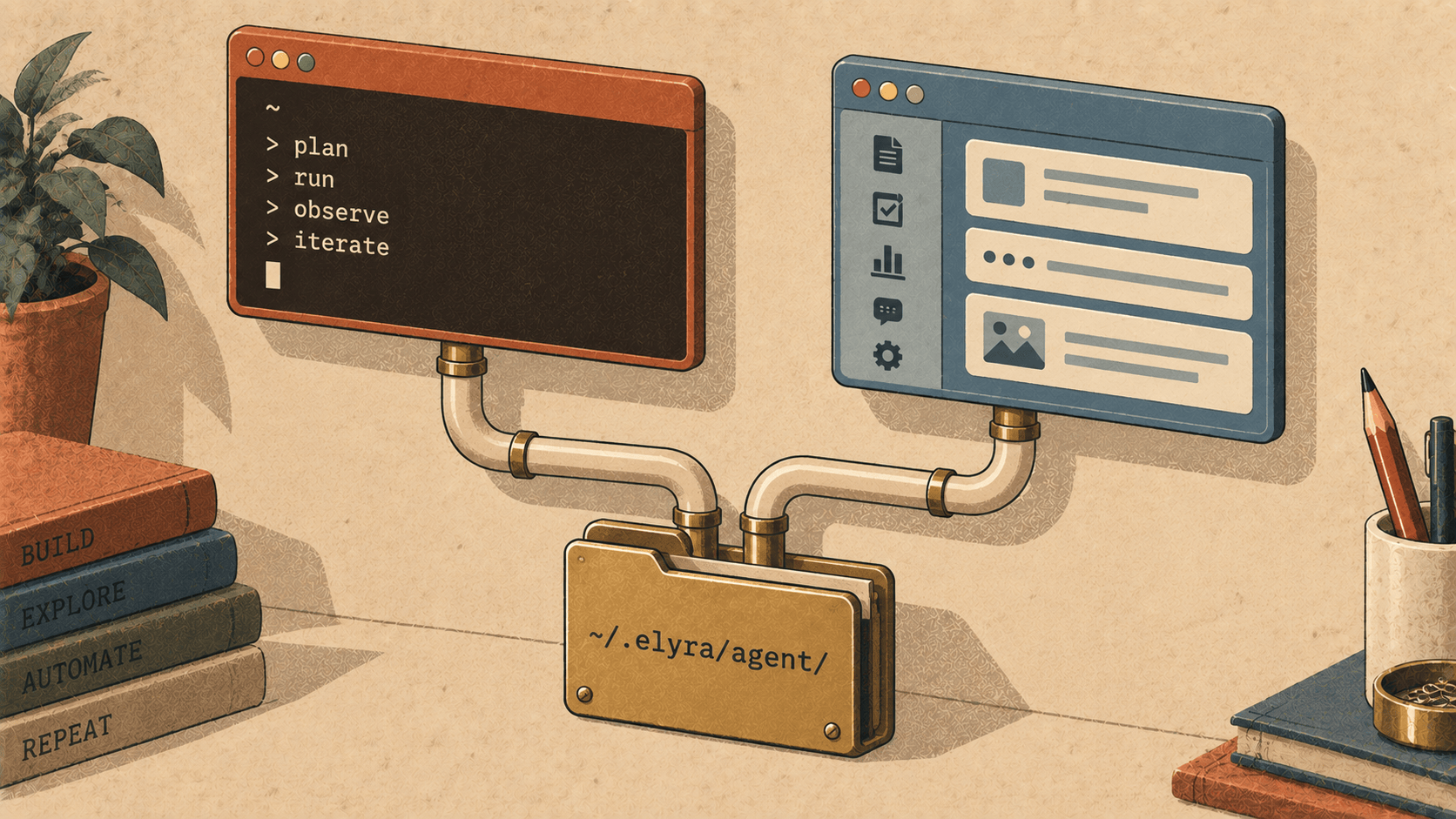
So here is Elyra Desktop. It is not a different product, and that sentence is the most important one in this article. It is the same agent — the same loop, the same tools, the same providers, the same sessions, the same extensions — in a native window for macOS and Linux.
Same agent, literally
The desktop edition reads and writes the same directory the terminal does: ~/.elyra/agent/. Settings, credentials, sessions, skills, prompt templates, themes, memory, the decision log — one copy, shared.
Which means this works:
$ elyra
› Add a formatCost helper next to formatTokens and make pnpm check pass.
  … (working) …
› /tree
…and then, in Elyra Desktop, that same session is sitting in the sidebar. Open it, read the diff with the code coloured as code, rewind two turns with a click, and continue. Close the window, go back to the terminal, and elyra picks up exactly where the window left off. A login in one is a login in the other. A skill you write in one is available in the other. There is no sync, because there is nothing to sync.
That was the design constraint from the first commit, and it is why the desktop edition took the shape it did — a Rust core that is Elyra, with Svelte drawing on top of it through Tauri — rather than a wrapper talking to the CLI over a pipe. (We built that wrapper first, in the spring. It taught us what we didn't want.)
What the window gives you
The session tree, visible. /tree in the terminal shows you a tree as text. In the window it is a tree — click a branch to jump there, see where a fork happened, watch a branch summary appear when you leave one. Rewind, fork, clone and compact are the same operations they always were; you can just see what they did.
Diffs you can read. Every edit the agent makes is a block with the file, the lines, and the change coloured — additions, removals, context. Tool output collapses to a line when you are done with it. A failing pnpm check is red where it failed, not somewhere in eight hundred lines.
Extensions with a face. The TypeScript extensions you already use run in the desktop edition through a bundled extension host, over the same JSONL protocol the terminal uses. Their tools, commands and status lines appear in the window; a dialog an extension asks for is a real dialog. /reload re-discovers extension paths, and /config lets you turn individual extensions, skills, prompts and themes on and off from a panel rather than a settings file.
Updates that install themselves. /update — or the banner on start — downloads the new build, verifies it, installs it in place and restarts. More on the verifies below, because it matters.
Everything else you already know. All nine provider protocols (Anthropic, OpenAI completions and responses, OpenAI Codex, Azure, Google, Vertex, Mistral, Bedrock) and the OAuth logins. Compaction, retry, cross-provider failover, smart routing. /goal, /review, /bisect, /replay, /learn, /share, /doctor, /decisions. Cost tracking to three decimals in the footer, same as the terminal. If you know the slash commands, you know the desktop edition.
The Elyra theme
Elyra Desktop ships with a new default theme, and it is called, without much imagination, Elyra.
Deep navy surfaces — #0b0f1a for the window, #111827 for cards — with crisp one-pixel navy lines between them, and an indigo accent (#7b6cff) with teal, green, amber and magenta beside it. Headings take the soft indigo; code takes teal; list bullets are amber; the thinking-level indicator climbs blue → indigo → magenta as you turn the dial up. It was modelled on a dashboard someone showed us with the words clear lines, fresh colour, nothing muddy, and that is a fair description of what we were after.
Tokyo Night is still there, and so are the six reference themes from the terminal edition. Custom themes in ~/.elyra/agent/themes/ hot-reload — save the file and the window changes. And there is a legibility floor: a theme cannot set text so close to its background that it disappears.
What "verified" means
Elyra Desktop is not open source, and its downloads come from elyracode.com rather than a GitHub release. That makes the update path something we owe you an explanation of.
When the app checks for an update, it fetches one small JSON file from elyracode.com. That file names the version and, for each platform, a download URL and a signature. The app downloads the build and verifies the signature against a public key compiled into the application — the private half lives on one machine and nowhere else. A manifest or a download that does not carry the right signature is refused, whatever it says about itself. A tampered CDN, a mistaken upload, a hostile intermediary: the worst any of them can do is fail the check.
The macOS build is signed with a Developer ID and notarized by Apple, and the notarization ticket is stapled into the bundle — so it opens cleanly on a machine that has never been online. The Linux builds carry the same updater signature.
We tested this the way you should test it: by shipping 0.1.0, then shipping 0.1.1, and running /update. It failed the first time. The updater tarball had a stray macOS metadata entry at the top that the installer tripped over — a mistake in our packaging, not in the signing, and one we had made once before on another product. We rebuilt the tarball, re-signed it, and the second run went through: 0.1.0 became 0.1.1 in place, theme and all. That is now the release script's problem to remember, not ours.
Platforms, honestly
macOS, Apple silicon. A notarized disk image. No Intel build: it has not been run on Intel hardware, and shipping one nobody has run is worse than shipping none.
Linux, x86_64 and ARM64. An AppImage and a deb for each. The AppImage is the package the updater replaces, so pick that one if you want
/updateto work; the deb is for apt. Both want WebKitGTK 4.1, which means Ubuntu 22.04 or later.Windows: not yet. Same reason as Intel Mac.
Extensions need Node 20 or newer on your PATH — the extension host is bundled, the Node that runs your extensions is not.
Which one should you use?
Both. That is the honest answer, and it is only possible because they share a directory.
Use the terminal when you are already there — in an SSH session, in a tmux pane next to the tests, in a CI script with elyra -p. Use the window when you want to read: a long review, a session tree you are about to prune, a diff that deserves colour. Switch whenever the moment changes. The agent will not notice.
Get it
Elyra Desktop is at elyracode.com/elyra — scroll to Desktop, or click the tab. It is free to use, like the terminal edition, with every feature. The desktop changelog is in the docs beside the terminal's, versioned separately, and the desktop guide covers installation per platform, updates, providers and extensions.
Open a session in the terminal. Finish it in a window. Or the other way round.